
Install Crush Suite or Relationship Map
This article is for the Salesforce admin who will install Crush, Relationship Map, or both. When you finish, the package is in the org, installed for admins only, and you know the next three setup articles.
Relationship Map-only customers install Relationship Map. Crush customers install the Crush Suite, which includes Relationship Map.
Before you start
- My Domain is enabled (Salesforce prerequisite for Lightning apps).
- You know who the first admins will be. Do not open the app to everyone on install.
- You have the install link from your Customer Success representative or the Prolifiq package-links page. Confirm you have the version your team agreed to before you click Install.
Install in a sandbox first when you can.
Install the package
- Open the production or sandbox install link you were given.
- Choose Install for Admins Only.
- Install for All Users gives people the app without the right permission sets. Do not use it for a first install.
- Click Install. Salesforce emails you when it finishes. Large packages can take several minutes.
- If you are not a system administrator, ask one to check Setup → Installed Packages and confirm the package name and version.
Confirm it installed
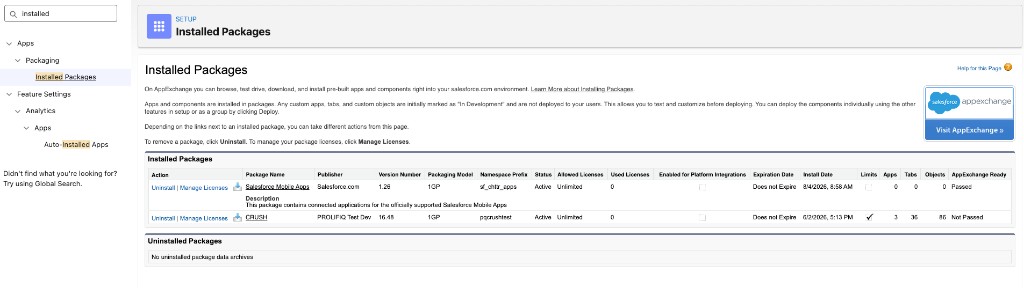
- Click the gear, then Setup.
- In Quick Find, enter Installed Packages.
- Find Crush or Relationship Map (the label on the package) and check the version.
Assign licenses if you need to
In many orgs, licenses assign automatically. If users still cannot see the app after permission sets, assign licenses from Installed Packages → Manage Licenses → Add Users.
Only administrators can assign licenses.
What to do next (do not skip)
The install does not finish setup.
- Assign Crush and Relationship Map permission sets
- Configure AI map generation if you will use AI-generated maps (each customer needs their own named credential — it cannot ship inside the package)
- Org settings and setup checklist
Users look for the app here: Find Crush and Relationship Map in Salesforce.
If you only use Relationship Map
Stop after the Relationship Map package, Relationship Map permission sets, and (if you use AI generate) named credentials. You do not need an Account Plan, Crush permission sets, or Presentation Mode to put a map on an Account or Opportunity.