
Assign Crush and Relationship Map permission sets
This article is for Salesforce admins. When you finish, each user has the permission set that matches their job — and nobody is waiting on “Install for All Users.”
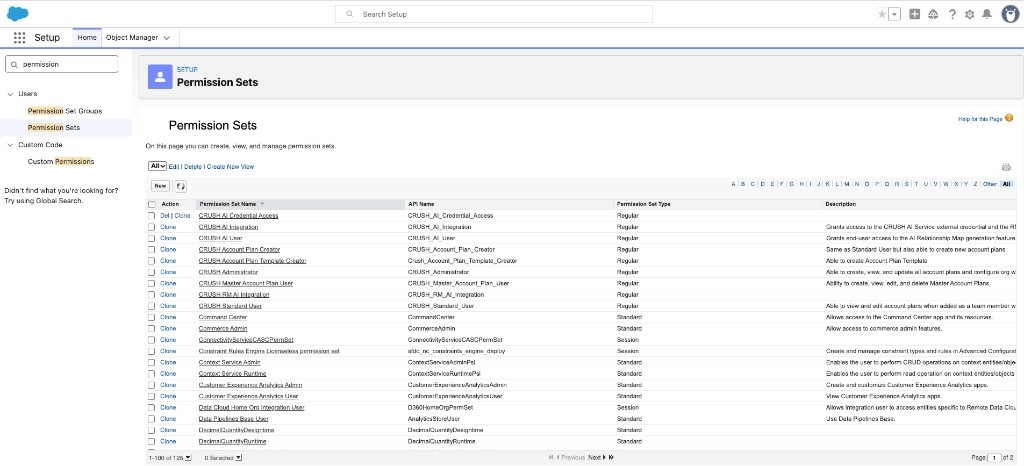
Labels below are the names in the current Crush package. Confirm them in your org (Setup → Permission Sets) before you assign at scale. If your Customer Success representative gives you different names, use those.
How to assign a permission set
- Click the gear, then Setup.
- In Quick Find, enter Permission Sets.
- Open the permission set.
- Click Manage Assignments → Add Assignments.
- Select users → Assign → Done.
Relationship Map
Use these if the user only needs maps, or in addition to Crush sets if they also plan.
| Permission set | Who it is for |
|---|---|
| PROLIFIQ RELATIONSHIP MAP Standard User | People who create and edit maps |
| PROLIFIQ RELATIONSHIP MAP Read Only User | People who should view maps only |
| PROLIFIQ RELATIONSHIP MAP Admin User | Admins who configure Relationship Map |
The RM Quick Start Scribe uses the same three roles with slightly different capitalization (Prolifiq Relationship Map Standard / Read Only / Admin User). In Setup, search for RELATIONSHIP MAP.
Crush (Account Planning)
Assign these only if Crush is installed and the user should work with Account Plans.
| Permission set | Who it is for |
|---|---|
| CRUSH Administrator | Org-level Crush setup |
| CRUSH Account Plan Creator | People who create and own plans |
| CRUSH Standard User | People who work in plans they can access |
| CRUSH Account Plan Template Creator | People who build Present templates |
| Account Plan Presenter | People who use Presentation Mode |
A common stack for a planner who also presents is CRUSH Account Plan Creator plus Account Plan Presenter. Some release notes said Presenter was later merged into Creator and Standard User. If you do not see Account Plan Presenter in Setup, the merged sets are enough — do not invent a set.
There is also CRUSH Master Account Plan User for portfolio / parent plans. Skip it unless you use Master Account Plans.
AI map generation
If users will generate maps with AI, also assign the AI sets that exist in your org (confirm in Setup). CRUSH AI Integration is no longer in the package — use CRUSH RM AI Integration for the integration user.
| Permission set | Who it is for |
|---|---|
| CRUSH AI User | People who click generate |
| CRUSH RM AI Integration | Integration / callback user |
| CRUSH_AI_Credential_Access (unmanaged) | External Credential principal access — create in the org; a managed set cannot grant this |
The credentials, custom metadata, and callback user are a separate admin step: Configure AI map generation.
Typical combinations
- RM-only seller: Relationship Map Standard User
- RM-only viewer: Relationship Map Read Only User
- Crush planner: Crush Account Plan Creator + Relationship Map Standard User
- Crush admin: Crush Administrator + Relationship Map Admin User
If someone still cannot see the app
See I can’t see Crush or an Account Plan. The usual causes are: installed for admins only and no permission set, wrong app (Crush vs Relationship Map), or they are not on the plan team.