
How the Account Plan score works
This article is for anyone looking at the score on an Account Plan and wondering what it is telling them. It is also for managers using the score in reviews.
Relationship Map-only customers do not have Account Plans. This page is Crush-only.
What the score measures
The Account Plan Score is a measure of how completely the plan has been built out in Crush. It is not a measure of how healthy the customer relationship is.
A well-run account with a thin plan scores low. A struggling account with a thoroughly documented plan scores high. Treat the number as a coaching signal about the plan, not a verdict on the account.
The default: 60 points, six components
By default the score is out of 60 — six components, each worth up to 10.
| Component | Earns points from |
|---|---|
| Opportunities | Opportunities linked to the plan |
| Cross-Sell | Filled cells on the Cross-Sell Map |
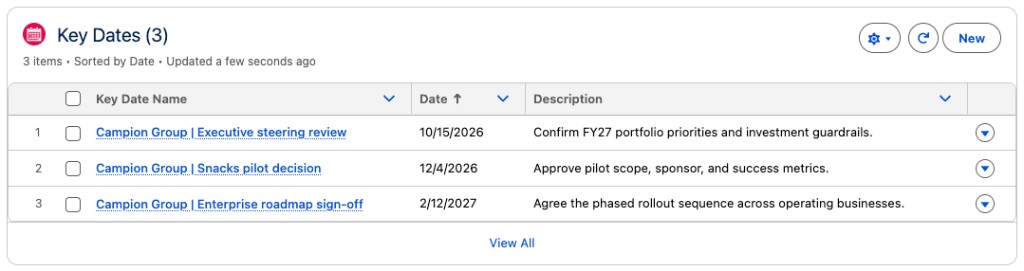
| Key Dates | Key Date records on the plan |
| Objectives | Objective records on the plan |
| Key Stakeholders | People on the plan's Relationship Maps |
| SWOT | SWOT items on the plan |
Your org may show slightly different component names, and an admin can add, remove, or reweight components, so your total may not be 60. The list above is what ships.
How a component earns its points
Each component counts records and awards points in bands. With the shipped defaults:
| Records in that component | Points |
|---|---|
| 0 | 0 |
| 1–2 | 3 |
| 3–4 | 5 |
| 5 or more | 10 |
So the first record is worth a lot and the fifth gets you to full marks. Beyond five, adding more records does not raise that component.
This is why plans jump from 0 to the high twenties after one working session, then move slowly. That is the design, not a stalled calculation.
Why a score drops when nobody changed anything
Each component also decays with time. The clock runs from the most recent change to the records in that component, and it multiplies the points that component earned:
| Days since the last change | Multiplier |
|---|---|
| Under 7 | Full points |
| 7 to 29 | ×0.75 |
| 30 to 89 | ×0.5 |
| 90 or more | ×0.25 |
A plan nobody has touched in three months keeps all its records and still loses most of its score. That is the intended message: an untouched plan is a stale plan.
Those day counts and multipliers are defaults. An admin can change them, or switch decay off per component.
Key Stakeholders counts map members
The Key Stakeholders component counts the people on the Relationship Maps attached to the plan — across all maps on that plan — rather than Key Stakeholder records.
If that component is stuck at zero on a plan that clearly has stakeholders, the people are probably recorded somewhere other than the map. Put the buying committee on the map: Create your first Relationship Map.
Reading a low component
A low component means that section of the plan is thin. Nothing more.
- Low Objectives — no measurable goals defined yet
- Low SWOT — quadrants left empty, the most commonly skipped section
- Low Key Dates — no milestones or renewal dates recorded
- Low Cross-Sell — the whitespace grid has not been filled in
- Low Key Stakeholders — the buying committee is not on the map
- Low Opportunities — no opportunities linked to the plan
Work the lowest component first, not the total. One empty component costs more than five half-filled ones.
When the number looks wrong
It did not change after you added records. The score recalculates when the score component loads. Refresh the Account Plan page.
A component shows zero and you are certain the records exist. Check they are attached to this plan. Records on the Account, or on a different plan for the same Account, do not count.
A component is missing from the breakdown entirely. An admin has turned that component off, or it points at a field that no longer exists. That is a Setup question for your admin.
Your total is not out of 60. An admin has changed the components or switched the org to a different scoring mode. Ask which one your org uses before you compare scores across teams.
Two plans with the same records score differently. Check the dates. Time decay is almost always the difference.
For admins
Scoring is configured in Setup under Custom Metadata Types → Account Plan Score Settings → Manage AP Score Settings. Each record is one component and controls:
- whether it counts toward the score at all
- which numeric field on the Account Plan it reads
- the three count breakpoints and the points awarded at each
- whether time decay applies, which date field drives it, and the day breakpoints and multipliers
You can add a component from any Roll-Up Summary, Number, or Formula field on the Account Plan, including custom objects linked by a master-detail field. Score colours and their thresholds are set separately in Org Settings.
Score history is captured weekly for Open plans by a scheduled batch. If trend charts are empty, the batch has not been scheduled, or the plans are Closed.