
Add team members and share a plan
This article is for whoever owns or runs an Account Plan. When you finish, the people who need the plan can open it, and you know which of the two sharing paths your org actually uses.
Relationship Map-only customers do not have Account Plans. This page is Crush-only.
Why nobody can see your plan
Account Plans use a private sharing model. By default the only person who can open a plan is its owner. Being able to see the Account, or having a Crush permission set, is not enough — access to an individual plan comes from being on that plan.
That is deliberate, and it is the single most common reason a manager says "I can't find your plan."
Add a team member
- Open the Account Plan.
- Go to Team Members — in the Quick Access Row at the top of the plan, or on the Overview tab.
- Click Add Team Member.
- Pick the person under Available Users.
- Set Role.
- Click Save.
Access is granted as soon as the record saves. There is nothing else to run.
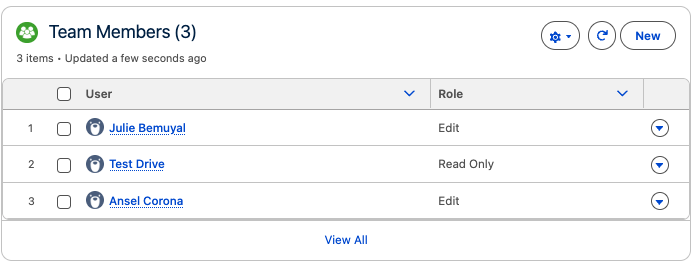
What Role controls
| Role | What they can do |
|---|---|
| Edit | Open the plan and change it |
| Read Only | Open the plan, change nothing |
Your org may show the view-only value as View rather than Read Only — the two mean the same thing. Use the value your org displays.
Role maps straight to Salesforce record access on the plan, so there is no separate sharing step to remember. Change the Role on the Team Member record and access changes with it.
Removing someone
Delete the Team Member record. Access is revoked immediately.
You cannot remove the plan Owner from the team list while that user is active — you will get "Owner cannot be removed from the team members list." If the plan needs a different owner, change the record owner instead of fighting the team list.
Account Teams: the other path
Some orgs do not want to maintain a plan team by hand when Salesforce Account Teams already exist. An admin can turn on Use Account Team Permissions in Org Settings, which lets the Account Team on the plan's Account drive plan access.
When that is on, the Update Account Team Sharing action on the plan pushes the current Account Team into the plan's sharing:
- Open the Account Plan.
- Run Update Account Team Sharing.
- Wait for "Account Plan Sharing Updated!"
Each Account Team member gets plan access at the level they already have on the Account. Anyone who has since left the Account Team loses the access that this action previously gave them.
Two things worth knowing:
- This is a sync, not a subscription. Changes to the Account Team do not reach the plan until the action runs again.
- It does not touch access that came from Team Members. The two paths work side by side, and a person can be on both.
Use one as your primary path. Teams that half-use both end up unable to explain who can see what.
Notifications
Crush emails the affected person when they are added to a plan, removed from a plan, or when their role changes. Plan team members are also notified about changes to objectives, key dates, stakeholders, SWOT, status, and goal.
All of it is off if an admin has turned off the master Enable Notifications toggle, and each event can be disabled individually in Org Settings. If people say they never got told, that is the setting to check — not a missing feature.
Edge cases
The person is an inactive Salesforce user. They are skipped when sharing is calculated. Reactivate the user, or add someone else.
"User is already a team member on this Account Plan." They are on the plan already; Crush blocks duplicates. Change the existing record's Role instead of adding a second one.
The plan is Closed. Every team member drops to read-only on a closed plan, regardless of their Role. The owner keeps edit access. Reopen the plan if people need to keep working in it.
They can open the plan but cannot see the Relationship Map or Cross-Sell. That is a permission set question, not a team question. See Assign Crush and Relationship Map permission sets.
They still cannot find the plan at all. Work through I can't see Crush or an Account Plan.