
What is Relationship Map?
Relationship Map is for anyone selling into a buying committee in Salesforce. When you finish this page you should know what a map is, why it lives in Salesforce, and whether the standalone app is enough or you also need Crush.
In complex B2B sales you are not selling to a company. You are selling to a buying committee. Deals typically involve several stakeholders with different priorities, influence, and feelings about your solution. Miss one of them and the deal stalls.
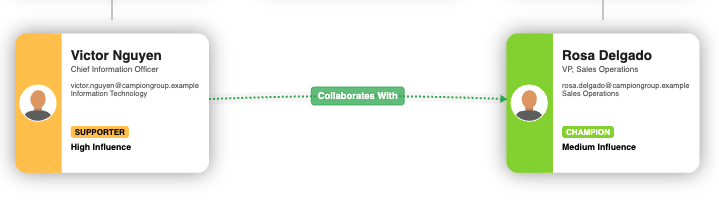
Relationship Map is a native Salesforce AppExchange app that makes that committee visible. Your team gets a shared picture of every stakeholder — who they are, how much influence they have, and whether they are a champion, a supporter, a floater, or a blocker.
What you get
- A visual map of the people involved in an account or opportunity
- Influence: Low, Medium, or High
- Support: Champion, Supporter, Floater, or Blocker
- Groups for clusters such as executive sponsors or technical evaluators
- Relationship lines for reporting lines and other ties (for example mentors or alliances)
Who it is for
Account executives, account managers, sales managers, and anyone selling into a committee larger than two or three people. At least half of Prolifiq customers use Relationship Map on its own, without Crush or an Account Plan.
Where it lives
Relationship Map is Salesforce-native. Maps use your Contacts, Users, and (when enabled) Leads. You can open a map from an Account, an Opportunity, or — if you also use Crush — an Account Plan. The same product works in all of those places. You do not need an Account Plan to create or use a map.
Standalone or part of Crush
Relationship Map is sold as a standalone AppExchange app. It is also one module of the Crush Suite, next to Account Planning.
If you only need the buying committee on the page, start with Relationship Map. If you also need structured account plans, Cross-Sell, score, and Presentation Mode, see What is the Crush Suite?.
What this is not
This page does not cover install, permission sets, or how to add the first person. Those are in Install Crush Suite or Relationship Map and Create your first Relationship Map.
Next
- Already a customer: Find Crush and Relationship Map in Salesforce
- Evaluating Crush as well: What is the Crush Suite?
- Book a demo: ask your Prolifiq representative (demo URL not published here yet)