
Customize a Relationship Map
This article is for people who already have a map and need it readable in a meeting. When you finish, cards and layout match how your team reviews a committee.
You do not need an Account Plan. Admins set org-wide defaults under Relationship Map Settings. You change what a single map allows when Show Chart Settings is on.
Before you start
- You can edit the map (PROLIFIQ RELATIONSHIP MAP Standard User, not Read Only).
- The map has more than two people. Create your first Relationship Map.
Layout and cards
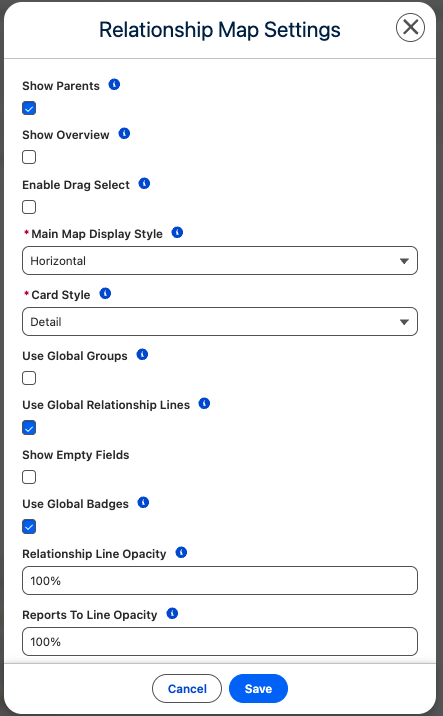
Open chart settings on the map (the settings control). Typical options:
| Setting | Why you would change it |
|---|---|
| Auto-layout | On for a first pass; off when you are presenting a specific shape |
| Display Style | Horizontal or Vertical |
| Card Style | Detail, Compact, or Fixed Size — Compact for a large committee |
| Show Empty Fields | Off unless you are cleaning data (Detail cards) |
| Show Parents | On when you need the hierarchy above the people you added |
| Show Overview | Pan control on a large map |
| Enable Drag Select | Select several cards at once |
Influence and support are not “customizing the map.” Set those in Add people and set influence and support.
Fields on the card
Display Fields
- Main Section — what sits on the face of the card.
- Extended / visible fields — extra fields when you open the card.
Contact fields come from Salesforce Contact. Map-member fields are influence, support, and any custom member fields your admin added.
If a field is missing, it is usually not on the Relationship Map settings layout. Ask an admin to add it. Point them at Org settings and setup checklist.
Groups and lines
- Use groups to cluster people (executive sponsors, technical evaluators) when Enable Grouping is on.
- Reports-to lines are the default hierarchy. Other relationship line types are a later article.
- Some orgs use global groups, lines, or influence values across maps. If settings show a “global” toggle and you are not sure, leave the admin default.
What stays admin-only
Do not treat this page as install documentation.
- Adding Relationship Map to a new object
- Turning Relationship Map Badges or extra line types on for the org
- Omni Viewer, clone-map policy, suggested contacts
- Photo URL / advanced tabs
Those belong with your admin or later help articles.