
Add people and set influence and support
This article is for anyone editing a Relationship Map. When you finish, each important person has an influence and a support value, and the Influence Chart is readable.
You do not need Crush. If the canvas is empty, start with Create your first Relationship Map.
What the two ratings mean
Influence is how much this person can move the deal or the account.
| Influence | Meaning |
|---|---|
| Low Influence | Limited ability to approve, fund, or block |
| Medium Influence | Material say, not the last word |
| High Influence | Can stall or advance the outcome |
Support is how they feel about you.
| Support | Meaning |
|---|---|
| Champion | Actively sells for you |
| Supporter | Positive, not carrying the deal |
| Floater | Uncommitted or unknown |
| Blocker | Working against you |
Your admin can rename these in an influence-and-support matrix. If your org shows different words, use what you see.
If everyone is unset, the people are on the map but nobody has assessed them. That is the usual coaching problem — not a missing feature.
Set ratings on a person
- Open the map.
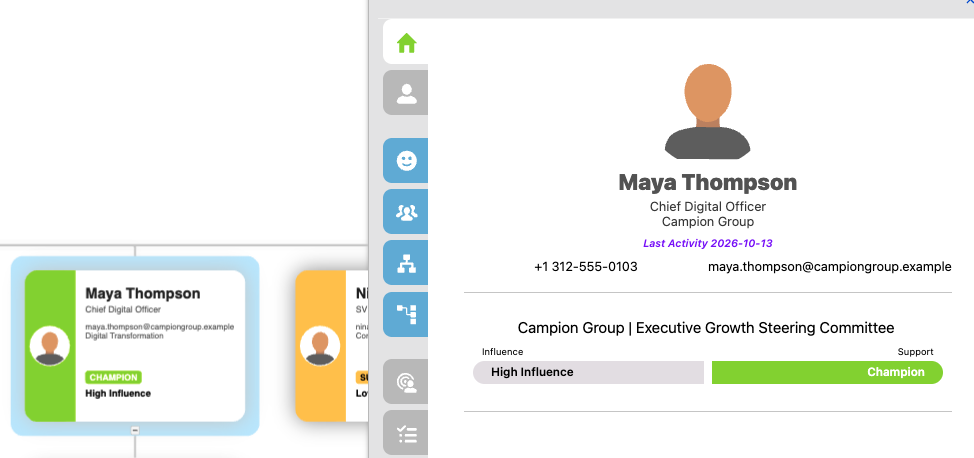
- Select the person (open the card or View Map Member details if that menu is on).
- Set Influence and Support.
- Save if the page asks you to.
Do this for every High Influence person before a review. An unlabeled High Influence Blocker is worse than a missing contact: the team thinks the map is finished.
Read the Influence Chart
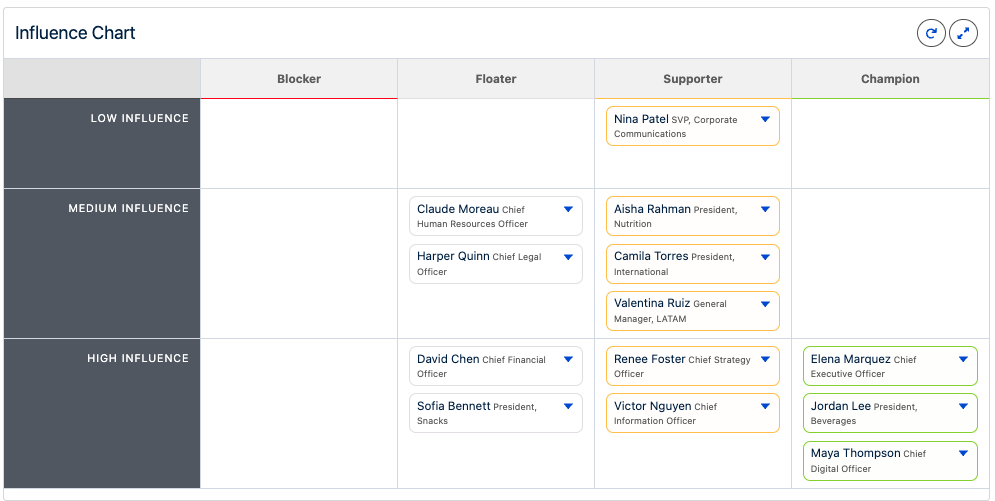
Open the Influence Chart on the map. Use it to see concentration: too many Floaters, no Champion, or a High Influence Blocker with no High Influence Champion.
Add more people as you learn
Same types as the first-map article: Contact, User, Lead, Placeholder. Set ratings as soon as you add someone so unset values do not pile up.
Groups (for example executive sponsors) help on a large map. Keep groups simple for now; nested groups are a later topic.